Airbnb Accessibility Features: How to Audit, Photograph, and Describe Your Property

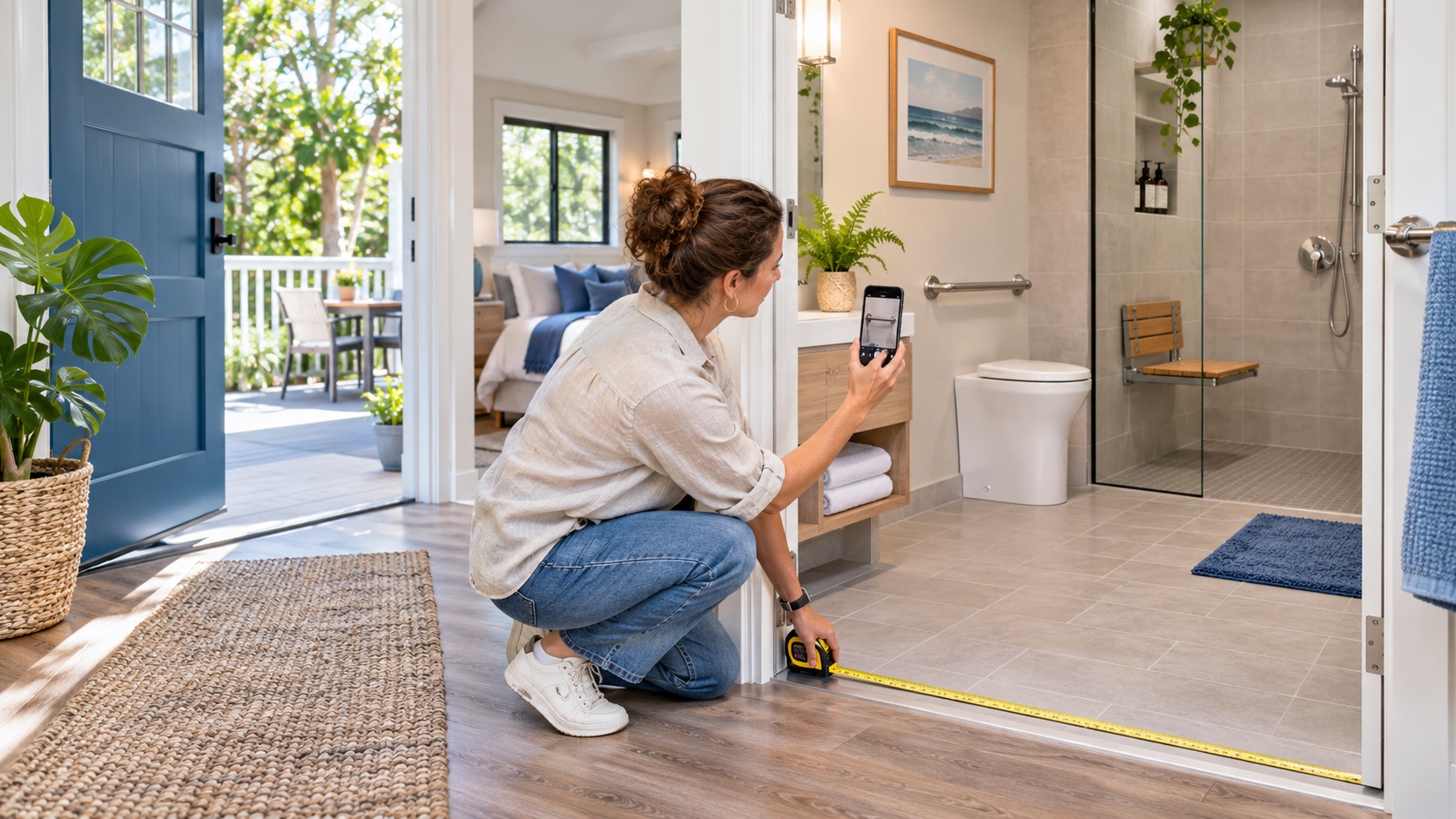
Accurate Airbnb accessibility features are verified measurements and photographs of the real property, not a broad claim that a home is accessible. Audit the guest journey from parking or arrival through the entrance, bedrooms, bathroom, kitchen, and shared amenities.
Guests need enough detail to decide whether a property works for their individual mobility, vision, hearing, or cognitive needs. A vague label can create a safety problem and a failed stay. This guide gives hosts and property managers a practical system they can document, test, and improve without relying on vague promises or unsupported claims.
What are Airbnb accessibility features?
They are property characteristics such as step-free routes, entrance widths, accessible parking, grab bars, roll-in showers, shower chairs, ceiling or mobile hoists, and step-free room access that a host can add to the relevant room in the listing. Airbnb requires supporting photographs and reviews submitted features for accuracy.
Accessibility is not one universal condition. A doorway that works for one guest may not work for another device, and a step-free entrance does not make every interior room step-free. Requirements can vary by jurisdiction, building, insurer, platform, and property type, so confirm the rules that apply to the specific listing before changing operations.
How the system works in practice
Start with a room-by-room audit, measure fixed constraints, photograph each feature from useful angles, publish exact descriptions, and answer guest questions without making assumptions about disability. A dependable process connects the listing, pre-arrival communication, property setup, staff instructions, incident response, and post-stay records. If one part contradicts another, guests and workers will follow different versions.
Map the full arrival path
Document parking surface, curb, slope, gates, thresholds, route width, lighting, and the distance to the entrance. Define who owns this control, when it is checked, what evidence is retained, and what happens when the standard is not met.
Measure instead of estimating
Record clear doorway width, threshold height, bed clearance, turning space, fixture height, and route pinch points with consistent units. Define who owns this control, when it is checked, what evidence is retained, and what happens when the standard is not met.
Photograph the feature in context
Show the entire route or room, then a closer view with a measuring tape when dimensions matter. Define who owns this control, when it is checked, what evidence is retained, and what happens when the standard is not met.
Describe barriers as carefully as features
Disclose steps, steep grades, narrow passages, heavy doors, loose rugs, and inaccessible shared amenities. Define who owns this control, when it is checked, what evidence is retained, and what happens when the standard is not met.
Keep room-level information aligned
The accessibility section, photo tour, captions, floor plan, description, and guest messages must describe the same layout. Define who owns this control, when it is checked, what evidence is retained, and what happens when the standard is not met.
Create a question-response standard
Staff should provide factual measurements and photos rather than deciding whether the property is suitable for a particular person. Define who owns this control, when it is checked, what evidence is retained, and what happens when the standard is not met.
Step-by-step implementation plan
- 1. Choose the audit route. Walk every path a guest may use from arrival through the rooms and amenities advertised.
- 2. Use a measurement sheet. Capture the same dimensions at every property and note the date and measuring method.
- 3. Correct movable obstacles. Remove furniture, planters, mats, and stored items that reduce clear routes.
- 4. Photograph every claimed feature. Use daylight where possible and show both the feature and its surroundings.
- 5. Write neutral descriptions. State dimensions and physical facts without calling the property fully accessible.
- 6. Submit features by room. Follow Airbnb’s current listing workflow and retain the original image files.
- 7. Train the support team. Give staff the audit sheet so they can answer questions consistently.
- 8. Recheck after changes. Repeat the audit after renovations, furniture moves, landscaping, or equipment replacement.
Do not launch the process only as a document. Test it at the property, ask the person responsible to complete it without coaching, and correct unclear instructions before the next reservation.
Example: a controlled pilot at one property
Audit one representative property and ask a colleague who did not perform the inspection to use only the listing and audit sheet to trace the guest journey. Any unanswered dimension or contradictory image becomes a correction before publication. The pilot should have a start date, responsible owner, pass/fail criteria, and a short review meeting. Expand it only after the team can reproduce the result and the records are complete.
Benefits hosts can evaluate
The value of Airbnb accessibility features should be judged through operational evidence, not a guaranteed revenue claim. Useful measures include completion rate, response time, repeated exceptions, guest questions, vendor rework, unresolved incidents, and the age of the last verified inspection.
- Fewer preventable suitability misunderstandings. Record a baseline before the change so the comparison is meaningful.
- Faster factual responses to pre-booking questions. Record a baseline before the change so the comparison is meaningful.
- Better alignment between listing claims and the physical property. Record a baseline before the change so the comparison is meaningful.
- A documented maintenance list for routes and equipment. Record a baseline before the change so the comparison is meaningful.
How to estimate cost and workload
Separate one-time setup from recurring work. Setup may include property inspection, equipment, professional advice, photography, templates, staff training, and configuration. Recurring work may include testing, replacement, monitoring, reconciliation, support, storage, and periodic review.
Request itemized vendor proposals and record assumptions such as property size, number of reservations, response coverage, service hours, replacement cycle, and taxes. A low purchase price can be misleading when installation, false alerts, staff time, or failed handoffs create recurring cost.
Use a small contingency for failures, but do not publish an invented savings figure. The decision should compare the expected workload and risk exposure with the current process and with realistic alternatives.
Training and guest communication
Train staff with the actual property, not only a shared document. Ask each role to demonstrate its task, find the current instruction, identify an exception, and explain the escalation route. Remove obsolete versions so a cleaner, co-host, or responder cannot accidentally follow an old process.
Guest-facing language should be short, specific, and timed to the decision. Put booking conditions in the listing, arrival details in the pre-arrival message, property instructions where the task occurs, and urgent guidance in an accessible emergency section. Do not hide a material restriction in a long house manual.
State what the guest needs to do, why it matters when useful, and how to get help. Avoid threats, ambiguous penalties, or claims that exceed platform policy, the rental agreement, or local law.
Testing, review dates, and change control
Test normal use and at least one failure path. Confirm that alerts reach a real person, backup access works, documents open on mobile, vendors have current instructions, and the team can act when the primary contact is unavailable.
Assign a version date to the standard and review it after an incident, property change, platform update, vendor change, or new legal requirement. Record who approved the revision and which listings, messages, signs, and staff documents were updated.
Operational metrics to monitor
Choose a small set of measures that reveal whether the process is being followed. Track completion before the deadline, exceptions by cause, time to acknowledge, time to close, repeated failures at the same property, vendor rework, guest questions, and overdue corrective actions.
Do not use a single percentage to hide a serious safety or compliance failure. Review the underlying records and separate leading indicators, such as missed checks or offline devices, from outcomes, such as an incident, refund, complaint, or cancellation.
Compare like periods and record external changes before drawing conclusions. A new vendor, renovation, severe weather, platform update, or different guest mix may explain a change. Use the data to select the next corrective action, not to manufacture a marketing claim.
Risks, limitations, and common mistakes
Using the word accessible as a guarantee
Needs vary, so describe features and barriers instead of promising universal suitability. The corrective action should address the cause, not merely add another message that staff or guests may ignore.
Showing only close-up photographs
A grab bar or ramp without the surrounding route does not show whether a guest can reach or use it. The corrective action should address the cause, not merely add another message that staff or guests may ignore.
Forgetting temporary barriers
Bins, snow, rugs, furniture, vehicles, and construction can invalidate an otherwise accurate route. The corrective action should address the cause, not merely add another message that staff or guests may ignore.
Speaking for the guest
Do not infer what a disabled guest can do; provide facts and let the guest decide. The corrective action should address the cause, not merely add another message that staff or guests may ignore.
Documentation and privacy controls
Keep dated measurements, room names, original photos, maintenance tickets, equipment instructions, and the date each public claim was checked. Keep only information needed for a defined operational, contractual, safety, accounting, or legal purpose. Limit access by role, use secure storage, and set a retention period. Never place access codes, identity documents, payment data, or private guest messages in an open team channel.
Separate facts from assumptions. A useful record states what was observed, when it happened, who verified it, what action was taken, and whether the issue was closed. Avoid emotional labels and unsupported conclusions.
Roles and escalation
- Owner or asset manager: approves the standard, budget, legal review, and exceptions.
- Property manager: maintains the workflow, trains vendors, checks records, and closes recurring gaps.
- Cleaner or inspector: completes property-level checks and reports exceptions with time-stamped evidence.
- Local responder: handles urgent, in-person tasks within a defined safety and authority limit.
- Guest communication lead: keeps messages accurate, timely, proportionate, and consistent with platform rules.
Damage to a safety-related feature, a blocked route, or a material mismatch before arrival requires prompt disclosure and a booking-support decision rather than hoping the guest will adapt. Emergency services should handle immediate threats to life or property. Platform support, insurers, payment providers, licensed professionals, or legal advisers should be involved when the issue exceeds the team’s authority.
Two practical scenarios
A step-free entrance with a narrow bathroom
The host publishes the entrance route and exact doorway widths, then clearly states that the bathroom doorway is narrower. The guest can evaluate the complete route rather than relying on one positive feature.
A removable shower chair goes missing
The cleaner reports the missing item before check-in. The manager replaces it, photographs the replacement, verifies stability, and updates the equipment record before confirming availability to the guest.
Quality-control checklist
- Arrival: Parking and drop-off route documented
- Route: Surfaces, slopes, steps, and thresholds checked
- Doors: Clear widths measured
- Rooms: Step-free access verified individually
- Bathroom: Fixtures and transfer space shown
- Photos: Context and measurement views retained
- Barriers: Material limitations disclosed
- Messages: Factual response template available
- Maintenance: Equipment and routes assigned to an owner
- Review: Public claims rechecked after changes
Schedule the next review now. A checklist without an owner and review date becomes an archive, not a control.
Frequently asked questions
Can a host say a property is wheelchair accessible?
It is safer and more useful to list verified features, measurements, routes, and barriers. Guests can then decide whether the property meets their needs.
Does Airbnb verify accessibility features?
Airbnb states that submitted accessibility features require photographs and are reviewed for photo accuracy before appearing in the dedicated section.
How should door width be photographed?
Show the open doorway and a visible measuring tape across the narrowest clear opening, plus a wider image of the approach.
Should hosts ask about a guest’s disability?
Ask what property information or accommodation the guest needs, not for unnecessary medical details.
How often should the audit be repeated?
Recheck on a scheduled cycle and whenever furniture, equipment, landscaping, access, or room configuration changes.
Answer-engine summary
Audit accessibility as a complete guest route, publish measurements and contextual photos, disclose barriers, and keep every claim synchronized with the physical property.
- Accessibility is feature-specific, not a universal label.
- Measure fixed constraints.
- Photograph context as well as details.
- Let guests evaluate suitability.
- Recheck after any property change.
Official sources and related PainHost guides
Final recommendation
Publish the property as it is, with verified detail that supports an informed decision.
Complete one route audit this week and replace every vague accessibility claim with a measurement, photograph, or clear limitation. Review the first month of records, correct repeated exceptions, and keep the public listing aligned with what guests will actually find.

Artigos Relacionados


Sobre o Autor
