Loyvox for Vacation Rental Hosts: How to Create Guest Satisfaction Surveys with AI

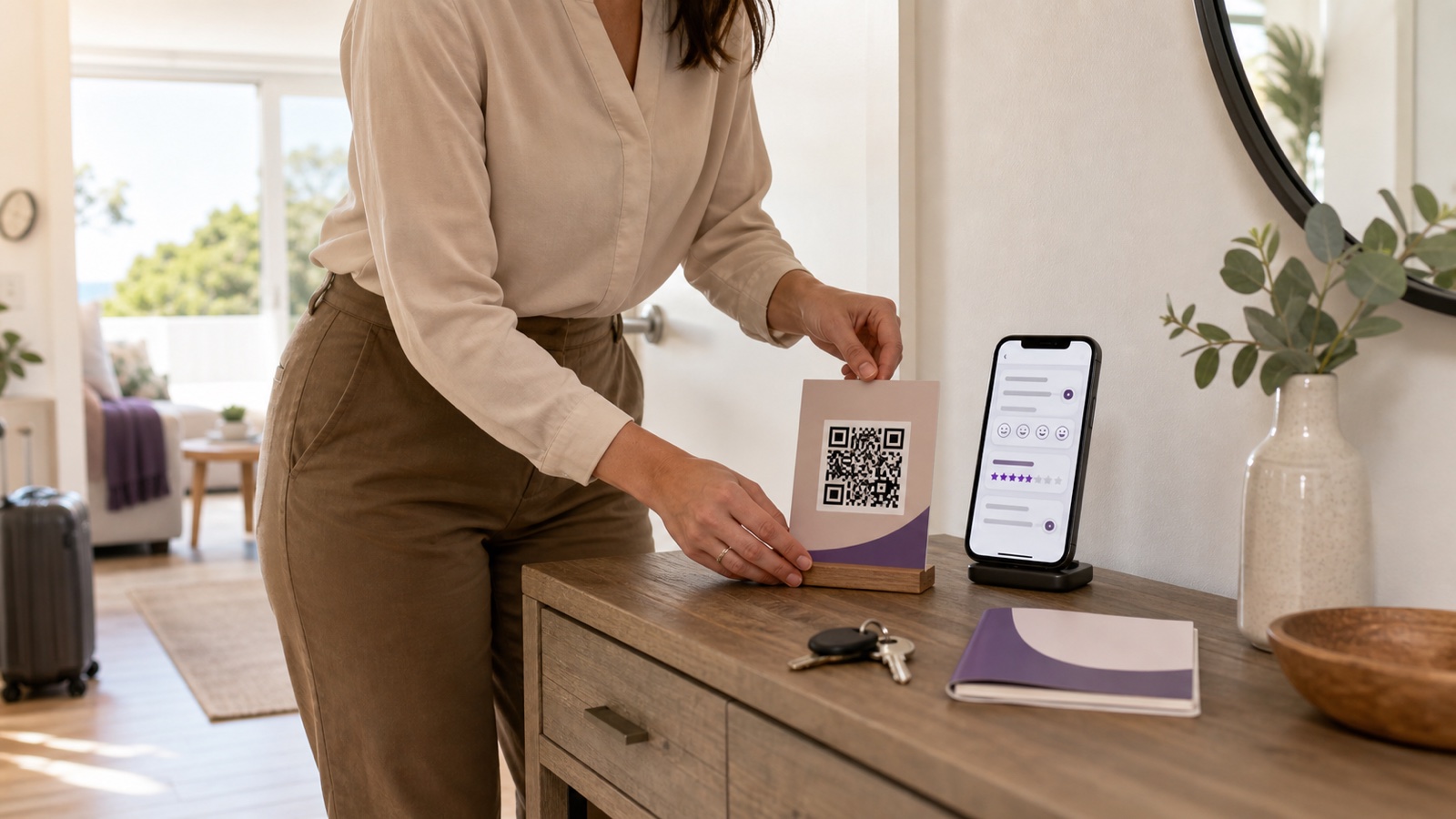
Guest feedback is most useful while a host can still act on it. A private message about weak Wi-Fi on the second night gives you a chance to help; the same complaint discovered in a public review arrives too late. Loyvox for vacation rental hosts offers a practical way to build short satisfaction surveys with AI, share them by link, QR code, WhatsApp, or email, and monitor responses as they arrive.
This guide explains how a short-term rental operator can use Loyvox without turning a stay into a research project. You will learn which survey to create, when to send it, what to ask, how to handle personal data, and how to convert responses into operational changes. The examples are designed for independent hosts and small property-management teams.
What is Loyvox?
Loyvox is a web-based survey platform that uses generative AI to help users create questionnaires and analyze feedback. Its public product pages describe support for NPS, CSAT, CES, live results, automatic charts, and sharing through public links and QR codes. The company also provides a dedicated hospitality use case for hotels and inns, which can be adapted to vacation rentals.
The workflow has three basic parts: describe what you want to learn or choose a template, customize and publish the survey, then distribute it and review the responses. Guests can answer from a browser, so they do not need to install an app or create an account. See the official Loyvox product page for the current feature description.
Why guest surveys can help vacation rental hosts
Booking-platform reviews are essential, but they serve a different purpose from private operational feedback. A review helps future travelers evaluate a listing. A survey helps the host understand a specific stay, interaction, or part of the property.
A carefully timed survey can help you:
- discover fixable issues before checkout;
- compare recurring experiences such as cleanliness, check-in, and Wi-Fi;
- give guests a structured private channel for detailed comments;
- identify which operational changes deserve priority;
- measure whether a new process improved the guest experience.
A survey must never be used to pressure guests, manipulate reviews, or hide legitimate complaints. It should be a listening tool. If a guest reports a safety, access, or habitability problem, respond through the normal support process immediately rather than waiting for a dashboard trend.
How to create a Loyvox survey for a vacation rental
1. Define one decision before writing questions
Start with the decision the feedback should support. “Learn what guests think” is too broad. Better objectives include “find friction in self check-in,” “verify whether the new cleaning checklist improved arrival quality,” or “identify missing information in the digital welcome book.”
One decision produces a shorter survey and clearer results. When a questionnaire tries to measure the entire business, guests face too many questions and the host receives a collection of unrelated signals.
2. Choose the right moment in the guest journey
Timing changes what a survey can accomplish. A first-night pulse checks arrival, access, cleanliness, and immediate comfort. A mid-stay survey can uncover maintenance or amenity problems while there is time to intervene. A checkout survey captures the overall stay. A later relationship survey can ask about recommendation, but memory and response rates may decline as time passes.
The official Loyvox hospitality page suggests using WhatsApp or a QR code during the stay to surface problems before departure. For vacation rentals, the message should remain optional and should not interrupt the guest repeatedly.
3. Ask the AI for a focused first draft
Instead of entering a vague instruction, give Loyvox a concrete brief. For example:
Create a five-question survey for guests after their first night in a vacation rental. Measure check-in clarity, arrival cleanliness, Wi-Fi setup, comfort, and whether anything needs immediate attention. Use neutral language and include one optional open-ended question.
Treat the generated questionnaire as a draft. Check every question for relevance, clarity, and bias. Remove anything that asks for information you do not need. Confirm that rating labels are understandable on a phone and that an open comment does not accidentally request sensitive data.
4. Keep the questionnaire short
A practical first-night survey might include:
- How easy was it to enter the property?
- How satisfied are you with the cleanliness on arrival?
- Did the Wi-Fi and essential appliances work as expected?
- Is there anything we can help resolve during your stay?
- What information would have made arrival easier?
Use conditional logic only when it makes the experience shorter. If someone reports an access problem, a follow-up can ask what happened. Guests who had no issue should not be required to pass through troubleshooting questions.
5. Review privacy settings before publishing
Decide whether responses need to be identifiable. Anonymous feedback may encourage honesty and reduce unnecessary data collection. Identified responses can make direct support easier, but they also require a clear purpose and appropriate handling.
Loyvox publicly describes anonymous collection, LGPD consent controls, and privacy-related settings. These tools do not replace your own legal responsibilities. Explain what you collect, why you collect it, how long you retain it, and who can access it. Never request passport numbers, payment information, door codes, medical details, or other sensitive information through a general satisfaction survey.
6. Test the complete mobile journey
Open the published link on a phone that is not logged into the host account. Check the introduction, question order, required fields, rating labels, confirmation screen, and accessibility. Submit test answers and verify that the results appear correctly. If you use a printed QR code, scan the printed version from normal viewing distance.
7. Share it without creating message fatigue
Choose one primary delivery channel. A short message might say:
We hope your first night went smoothly. If you have one minute, this short private survey helps us identify anything we can improve during your stay. For urgent help, reply directly to this message.
That final sentence matters. A survey is asynchronous; emergencies and access problems need a direct contact route. If you already use guest messaging automation, place the survey invitation carefully so it does not compete with check-in instructions or essential support.
Three useful survey workflows
Arrival pulse
Send once after the guest has had time to enter and settle in. Ask about access, cleanliness, accuracy of instructions, and urgent needs. Route negative answers to a human immediately. The goal is service recovery, not a score.
Checkout experience survey
Ask about the complete stay, the property’s accuracy, comfort, communication, and overall satisfaction. Include one open question about the most useful improvement. Avoid asking guests to promise a positive public review.
Post-change validation
After changing a mattress, check-in flow, cleaner, Wi-Fi provider, or welcome guide, use the same focused question for a defined period. Compare like with like: the same property, stage of stay, question wording, and rating scale. A small difference in mixed data may reflect seasonality or guest mix rather than the change itself.
How to turn responses into action
Reading every comment is not an improvement system. Create a simple weekly routine:
- Separate urgent individual cases from recurring themes.
- Tag themes such as access, cleanliness, noise, Wi-Fi, comfort, and information.
- Count repetition, but also assess severity and safety.
- Assign one owner and deadline to each accepted action.
- Document the change and the date it began.
- Recheck the same signal after enough comparable stays.
Do not let an attractive dashboard replace judgment. One report of a loose handrail can be more important than ten suggestions about coffee selection. Prioritize safety and essential functionality first, then high-frequency friction, then optional enhancements.
Common mistakes to avoid
- Sending too many surveys: choose moments that support a real decision.
- Using leading questions: “How excellent was our cleaning?” produces weaker information than a neutral satisfaction question.
- Combining two topics: do not ask guests to rate “cleanliness and comfort” in one response.
- Changing scales constantly: stable wording makes comparisons more meaningful.
- Collecting unnecessary personal data: minimize fields and explain the purpose.
- Failing to respond: a guest who reports a current problem expects help, not only measurement.
- Treating AI analysis as a verdict: read source comments and verify the context before acting.
Is the free Loyvox plan enough to start?
At the time of writing, the official Loyvox pricing page describes a free plan with unlimited surveys, up to 100 responses per month, three AI analyses per month, public link and QR-code sharing, automatic charts, and one account user. Paid tiers add capabilities such as branding, higher response allowances, exports, filters, alerts, advanced reports, and additional team access.
A host with one or two properties may be able to validate a compact workflow within the free allowance. A manager with many units should estimate invitations, expected responses, team roles, reporting needs, and export requirements before choosing a plan. Pricing and limits can change, so verify the current page before subscribing.
Vacation rental survey launch checklist
- Write the operational decision the survey will support.
- Select one stage of the guest journey.
- Limit the survey to essential questions.
- Use neutral wording and one concept per question.
- Provide a direct channel for urgent support.
- Choose anonymous or identified collection deliberately.
- Add the required privacy and consent information.
- Test the link and QR code on a real phone.
- Assign responsibility for reviewing responses.
- Define how recurring feedback becomes a tracked action.
Frequently asked questions
Can Loyvox be used for Airbnb guest surveys?
Yes. Loyvox is a general web survey platform, and its hospitality materials describe guest NPS, satisfaction surveys, real-time results, and mobile sharing. Vacation rental hosts can adapt those workflows to Airbnb, Vrbo, direct-booking, or multi-channel guests while respecting each platform’s rules.
Should I use NPS or CSAT after a stay?
Use CSAT for satisfaction with a specific interaction or part of the stay, such as check-in or cleaning. Use NPS when the objective is broader recommendation and relationship sentiment. The next article explains how to measure NPS and CSAT in vacation rentals.
Should guest feedback be anonymous?
It depends on the purpose. Anonymous collection may encourage candid comments and minimize personal data. Identified collection can support service recovery. Tell guests which approach you use and never imply anonymity if responses can be linked to a person or booking.
Can a survey prevent negative reviews?
No tool can or should guarantee that outcome. A timely survey can reveal a fixable issue, but hosts must respond fairly and should not pressure guests or selectively manipulate review behavior.
Final verdict
Loyvox for vacation rental hosts is most useful when it supports a small, repeatable feedback process. Start with one short survey, one moment in the stay, and one owner for follow-up. The technology can make creation, distribution, and analysis easier; the value still depends on asking neutral questions and acting responsibly on what guests report.
Before choosing a paid plan, run a limited pilot, review the current feature and pricing pages, and confirm that the workflow improves decisions instead of simply generating more data.
Artigos Relacionados




Sobre o Autor

0 Comentários